I spent the last month intensively testing the capabilities of the Generative Pre-trained Transformer in the aspect of programming. I asked myself — can I create a customized Spotify client using Ctrl+C / Ctrl+V, tailored to my whims (a radio alarm clock with Discover Weekly based on a RaspberryPi and a ’60s tube radio definitely is one). With GPT4, this is possible. Currently, the project has 1485 lines of Python code in 70 files. It’s worth adding that I don’t normally program in Python. Does this mean that anyone can be a programmer? At the moment, the answer is — no.
I have no idea who holds the copyright to this.
Architecture and Engineering
The skill that will be key in the upcoming era of AI is asking the right questions. Crucial for that handful of people who will still work intellectually. Asking the right questions, leading the shortest way to achieve a specific goal, still requires intelligence and knowledge gained through experience. In the context of programming, it’s not so much knowledge of the language and library interfaces, but general knowledge of architecture/engineering software, the environment we work in, and intuition.
Memory…
To effectively program with GPT4, you need to be aware of its limitations. Human memory can be divided into several types:
Image credit: Queensland Brain Institute, This work is licensed under a Creative Commons Attribution 4.0 International License.
From long-term memory, GPT4 has semantic memory (language model) and short-term — session, which consists of tokens. GPT does not expand its general knowledge and does not remember its experiences (lack of episodic memory, only knowledge of “what”, “where” and “when” until the model is trained). GPT4 can handle a maximum of 4096 tokens in one session. It’s hard to “eyeball” exactly how many tokens a piece of code has*, a token can be a single character (parenthesis, comma, or even whitespace), it can be a variable name, but the variable name itself can also consist of several tokens. In practice, GPT4 turns out to be very good at handling Python code that has several hundred lines of code (the less, the better), but it doesn’t know the entire project. Therefore, the basic principle that one must impose on oneself is decoupling in all its forms and at every level of the project.
Single Responsibility Principle — One class/function/method should serve only one purpose. Without this assumption, at some point, our code will not fit in the session. Break up blocks and functions, create private methods, then move them to new classes.
Modularization — We should strive to ensure that the entire module that the transformer is able to process (along with our query/instruction) fits into the session. Avoid monolithic applications. Create modules and libraries with a simple interface so that it’s easy to define the data passed to the function and the return value. Microservices can also be a solution. GPT doesn’t know the entire relational database and all models.
Avoiding Global State — In my project, I allowed myself to create a Singleton with configuration, but it’s worth stopping at such actions.
DRY? — yes and no. It is important to maintain low code complexity and readability. DRY allows creating concise code that will fit in the session, but GPT will not know all parts of the system that use it.
Very important is also clear and unambiguous naming of variables, classes, and functions. I would avoid writing comments — they take up valuable space, and the code should be understandable regardless of whether they are there or not. GPT tends to produce comments, it’s worth deleting them and writing self-commenting code.
Metaprogramming? — and here, as in the case of DRY, I have objections. Metaprogramming allows shortening many repetitive parts of the code, but makes it less readable and MUCH more difficult to debug.
Summary
GPT4 still does not replace a programmer. However, it successfully copes with implementation. Its main limitation is the lack of knowledge of a broader context. GPT4 does not learn; it already knows a lot, but it does not know our project. We must ask proper, well-defined questions. We must verify each answer based on our experience and intuition, define parameters, expected output and dependencies, as long as they are not public. We need to think about whether the received code meets our expectations in terms of functionality and code quality. We must take care of the architecture and refactoring ourselves. We need to look for edge cases and scrutinize everything to get what we want from it.
By the way, this article is written in Polish. It was translated by GPT4 with no corrections. At least it was written by me. I’m unsure what fate awaits programmers when AI acquires episodic memory and the ability to learn on the fly. I’m asking myself what alternative job positions will be available for us… if we like to think, it may turn out that it will no longer be needed by society.
* to accurately count the number of tokens, you can use the transformers library from Hugging Face.
Make Your Specs 🚀 Faster with Poltergeist. And ❌ Fail.
Some time ago we decided to make our acceptance tests faster. We were using Cucumber with Selenium and we replaced it with the Poltergeist driver. Poltergeist uses the PhantomJS engine and thanks to that our tests run around three times faster then they did before. Everything works smoothly on our machines, but there is one small problem; Sometimes, in some steps PhantomJS crashes on CircleCI :).
Scenario: xxx # features/xxx.feature:19
PhantomJS has crashed. Please read the crash reporting guide at https://github.com/ariya/phantomjs/wiki/Crash-Reporting and file a bug report at https://github.com/ariya/phantomjs/issues/new with the crash dump file attached: /tmp/1a24bbe0-87e2-2753-3444a3a4-65f405d9.dmp
[1.78] Given Logged in User # features/step_definitions/support_steps.rb:9
PhantomJS client died while processing {"name":"visit","args":["http://127.0.0.1:39185/users/sign_in"]} (Capybara::Poltergeist::DeadClient)
./features/step_definitions/support_steps.rb:13:in `/^Logged in User$/'
features/xxx.feature:20:in `Given Logged in User'
This forces us to click “rebuild” a few times in a row. This doesn’t make our tests faster, but the direction is good. So what could we do? We could:
Connect with CircleCI VM using SSH.
Download the crash dump.
Notice that it contains sensitive data.
Report the crash by creating an issue on GitHub. (I surrender)
Wait for someone to fix it or fix it by ourselves.
Wait for a new version of Poltergeist.
Wait for CircleCI to update their Poltergeist version.
Or maybe…
🔄 Rerun Failing Specs
Cucumber, as with most of the testing tools out there, allows you to choose an output format. What’s more, is it has one specific format called rerun which writes a list of failing scenarios to a specified file.
cucumber -f rerun --out failing_scenarios.txt
Once you have this file, you can run these scenarios again:
cucumber @failing_scenarios.txt
It’s as easy as that! Let’s write rake tasks which do this:
namespace :failing_cucumber_specs do
FAILING_SCENARIOS_FILENAME = 'failing_scenarios.txt'
task :record do
# run cucumber and record failing scenarios to the file
# exit 0, we don't want to fail here
exec("bundle exec cucumber -f rerun --out #{FAILING_SCENARIOS_FILENAME}; exit 0")
end
task :rerun do
# we don't need to run cucumber again if all scenarios passed
unless File.zero?("#{FAILING_SCENARIOS_FILENAME}")
# run cucumber with failing scenarios only
exec("bundle exec cucumber @#{FAILING_SCENARIOS_FILENAME}")
end
end
end
At the beginning I was afraid that this would not work with parallel nodes; failing_scenarios.txt shouldn’t be shared between them. But every CircleCI node is an independent virtual machine, with it’s own filesystem, so every node has separate file.
It’s good idea to put failing_scenarios.txt to the .gitignore file before committing changes.
🎒 Usage with Knapsack
We use Knapsack (written by Artur Trzop) which splits tests among multiple nodes. Knapsack has it’s own adapter for Cucumber, so I had to modify the failing_cucumber_specs:record task. Here is a version for Knapsack:
namespace :failing_cucumber_specs do
FAILING_SCENARIOS_FILENAME = 'failing_scenarios.txt'
task :record do
# run cucumber and record failing scenarios to the file
begin
Rake::Task['knapsack:cucumber'].invoke("-f rerun --out #{FAILING_SCENARIOS_FILENAME}")
rescue SystemExit => e
# exit 0, we don't want failed build because of this task
puts "#{e.class}: #{e.message}"
exit 0
end
end
task :rerun do
# we don't need to run cucumber again if all scenarios passed
unless File.zero?("#{FAILING_SCENARIOS_FILENAME}")
# run cucumber with failing scenarios only
exec("bundle exec cucumber @#{FAILING_SCENARIOS_FILENAME}")
end
end
end
🤔 Possible Troubles
🏃🚪 Exit 0 Is Not a Perfect Solution
If you look closely at the rerun task, you can see exit 0 after running Cucumber. We must return a successful exit code, because we don’t want our build to be interrupted during recording failing scenarios. The problem with Cucumber is that it returns 1 when some scenarios fail as well as when it fails itself for any reason. Imagine such a situation:
Cucumber doesn’t run specs, creates an empty failing scenarios file and crashes.
CircleCI doesn’t notice that, because we force exit 0.
Second Cucumber execution run specs from an empty file. No specs, so it returns 0.
Build is green.
Fortunately, the first point seems to be very unlikely. Even if Cucumber fails for any reason other than red specs (that’s already unlikely), it doesn’t create an empty file, so the second Cucumber run fails. However there was a feature request regarding Cucumber exit status codes. It’s implemented and merged to the master branch so in future releases we will be able to determine whether scenarios failed (exit status 1) or application returned error (exit status 2).
📉 Less Trust in Specs
Imagine some functionality which doesn’t work as expected from time to time, let’s say, because of a race condition. This problem could be noticed when it’s test fail. Rerunning failing tests decreases the probability of detecting this issue. I don’t think it’s a huge problem in our case as I’ve never encountered this in any project I was working on at our company, but I feel obligated to mention this.
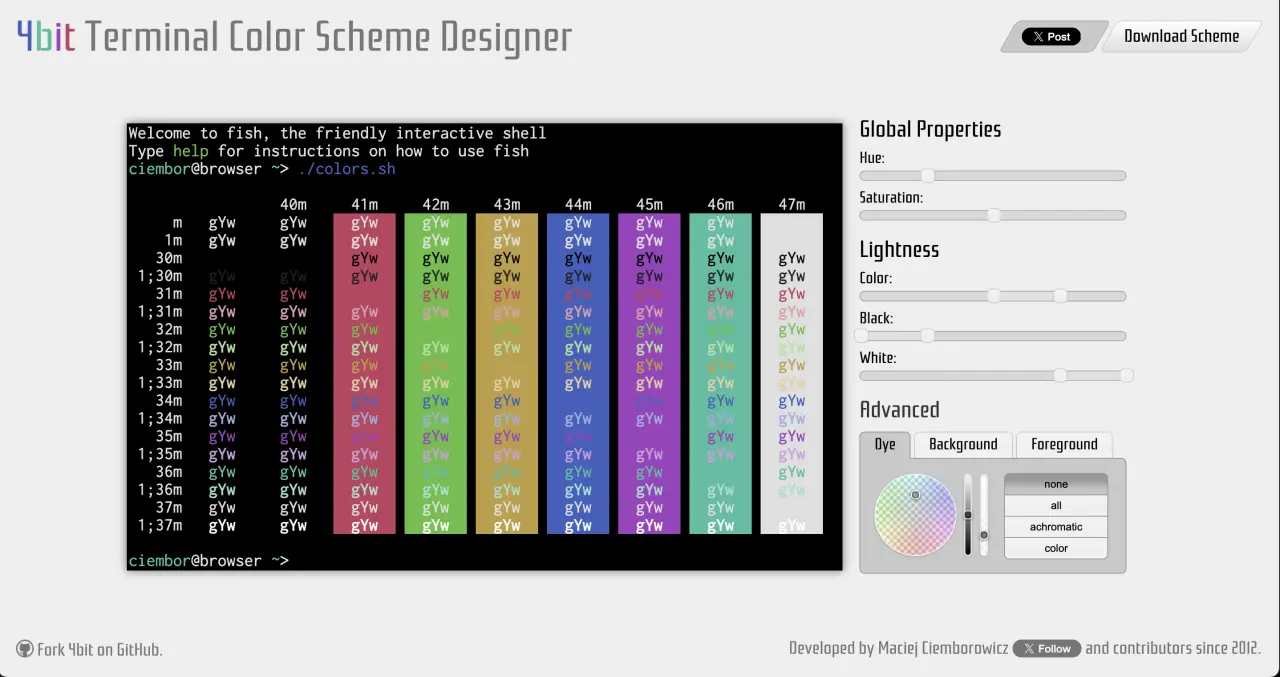
4bit Terminal Color Scheme Designer allows you for creating consistent terminal color schemes. You don't need to know anything about aesthetics, 4bit will take care of it for you. Choose the hue, saturation, and brightness of the palette. The rest is magic. Then export it to a configuration file or a command for (almost) any terminal.
The project was at the top of the Hacker News front page for over 3 days and received very positive feedback. It also received 228 votes on r/linux subreddit - back in a days this was A LOT, much more than today.
Mintty,
the default terminal emulator for Cygwin and Git for Windows, has in its options a button that directly links (sic!) to the 4bit Terminal Color Scheme Designer.
4bit was an inspiration for the
terminal.sexy project, as described in its "About" section.
It is listed first in the Credits section of the
Gogh project - the largest collection of color schemes on the internet.
The project reached the front page of the Polish portal
wykop.pl.
It's hard to estimate the number of shares and mentions on various sites, but there were a lot.